Website chatbot · Workflow builder on Professional

A chatbot trained on your site.
Live on your pages. Yours to design.

Crawl your website, keep it in sync, and embed a branded widget that answers from your content — hours, products, policies. When someone asks for a person, it takes their number. Professional adds a visual workflow builder for multi-step conversations: orders, quote requests, onboarding. No coding. Lead capture on Smart. Workflows on Professional.

Smart plan · $19.99/month after a 15-day $4.99 trial
RAG AI Chatbot
Chatbot live on your site
Answers from your pages · widget you designed
How the chatbot gets on your site

Train it on your pages. Design the widget. Embed it. Workflows come next if you need a process.

1
Pick a starter

Home services, restaurant, clinic, retail, real estate, or a blank bot. Industry FAQs and lead capture are already on.

2
Crawl and keep in sync

Add your website or any public site, plus files. Schedule a re-crawl so answers stay current.

3
Design the chatbot

Colors, greeting, personality, intents. Embed a pop-out widget or iframe. Visitors chat with your content, not generic AI.

4
Leads and workflows

Smart takes a callback when the bot cannot help. Professional adds a visual builder for multi-step conversations.

The chatbot, then the extras

Smart is the live website chatbot. Professional adds the workflow builder.

Answers from your site

Crawl pages, upload files, and add FAQs. The bot answers from your content. Auto-sync re-checks the site on a schedule you set.

Website chatbot you design

Colors, fonts, greeting, bot name, launcher. A pop-out widget or iframe on any page. Visitors talk to your brand, not a generic box.

Easy Integration

Deploy on any website with a simple iframe or use our premium pop-out widget. No technical skills required.

Workflow builder

On Professional: a visual drag-and-drop builder for multi-step conversations — collect an order, take a quote request, onboard a customer. See the builder.

Lead capture

After missed answers, or when someone asks for a human, a form collects name, phone, and email. You get the lead by email and optional webhook. See how it works.

Inbox + monthly outcomes

Unanswered questions sit in a list you can turn into FAQs. Each month you get answered vs unanswered, leads captured, and sync health — emailed if you want.

Visual workflow builder

Professional plan · drag-and-drop · no coding

When a chatbot answer is not enough, build a conversation that collects the next step: an order, a quote request, onboarding, a support ticket. Test it, then publish it on the same widget.

Visual Builder

Design workflows using our intuitive drag-and-drop interface. Simply point and click—no programming knowledge required!

  • Drag-and-drop state machine builder
  • Visual workflow designer
  • Real-time testing panel
  • One-click publish to production

Smart Automation

Automatically capture information from conversations and perform actions—from collecting data to calling APIs.

  • AI-powered variable extraction
  • Multi-step conversation flows
  • Conditional branching logic
  • API integration (no coding needed)

What you can automate in the builder

These are multi-step conversations you design. Smart still takes a callback if you only need a number. The builder does not book a live diary.

Order Collection Workflow

Automate the entire order-taking process:

1. Capture Details: Customer name, product preferences, quantity
2. Confirm Order: "You want 5 blue shirts, size L. Correct?"
3. Process: Save to your system or send confirmation email

Result: Complete orders automatically without manual data entry

Callback / lead-capture flow

When someone wants a person, take their details:

1. Trigger: Visitor asks for a person, or the bot missed twice
2. Form: Name, phone, email, and a note — on your site
3. Notify: Email the team plus optional HMAC-signed webhook

Result: A lead in the dashboard. Your team returns the call. Not a live calendar.

Quote-request flow

Take the job details now. Price it later — honestly:

1. Gather: Name, phone, and what they need
2. Notify: Email plus optional webhook into your CRM
3. You quote: The bot does not invent prices

Result: Overnight requests waiting on your desk, not a made-up number in chat

Customer Onboarding Workflow

Guide new customers through setup:

1. Collect Profile: Name, email, preferences, needs
2. Validate & Welcome: Create account, send welcome email
3. Guide Setup: Walk through features step-by-step

Result: Automated onboarding that saves hours of manual work

Support Ticket Workflow

Automate customer support triage:

1. Capture Issue: Problem description, priority level
2. Route & Create: Create ticket in your support system
3. Follow-up: Send ticket number and next steps

Result: Organized support requests without manual ticket creation

Feedback Collection Workflow

Systematically gather customer feedback:

1. Request Feedback: After service completion
2. Collect Ratings: Satisfaction score, detailed comments
3. Store & Thank: Save to your database, send thank you

Result: Continuous feedback collection for business improvement

Why Workflows Matter for Small Businesses

Save Time & Money

Automate repetitive tasks that currently require staff time. Focus your team on high-value work.

24/7 Automation

Handle customer requests even when you're closed. Never miss an opportunity.

No Coding Required

Visual builder means anyone can create workflows. No developer needed!

Scale Your Business

Handle more customers without hiring more staff. Grow efficiently.

Available on the Professional plan
Start automating your business processes today—no technical experience needed!

View Pricing & Get Started

How It Works at AIInSync

Get your chatbot up and running in just 3 simple steps

1

Upload Your Knowledge

Upload documents (PDF, DOCX, TXT), scrape URLs, or connect to your website. Your chatbot learns from your content.

  • Document upload
  • URL scraping
  • Website crawling
  • Database connection
2

Build Vector Store

We automatically create a semantic search index from your content. This enables intelligent, context-aware responses.

  • Automatic processing
  • Semantic indexing
  • Fast retrieval
  • Easy updates
3

Design & Deploy

Customize appearance, add intents, set personality, and deploy to your website. It's that simple!

  • Visual customization
  • Intent management
  • One-click deployment
  • Live in minutes

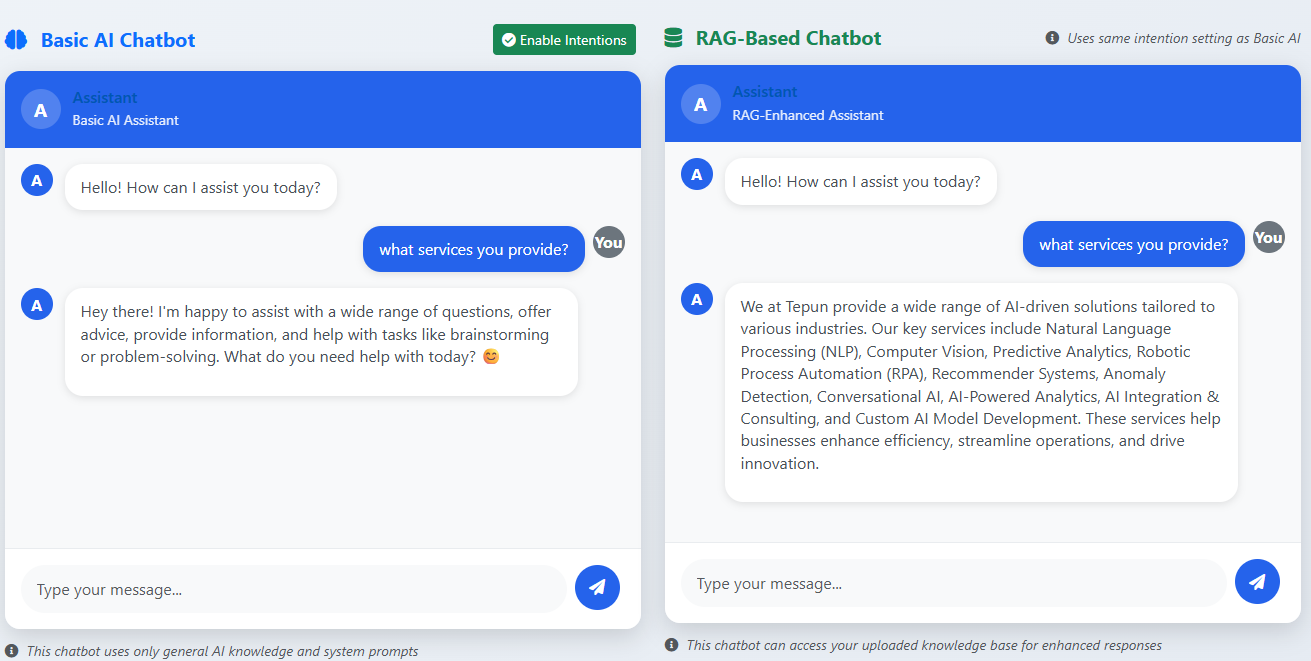
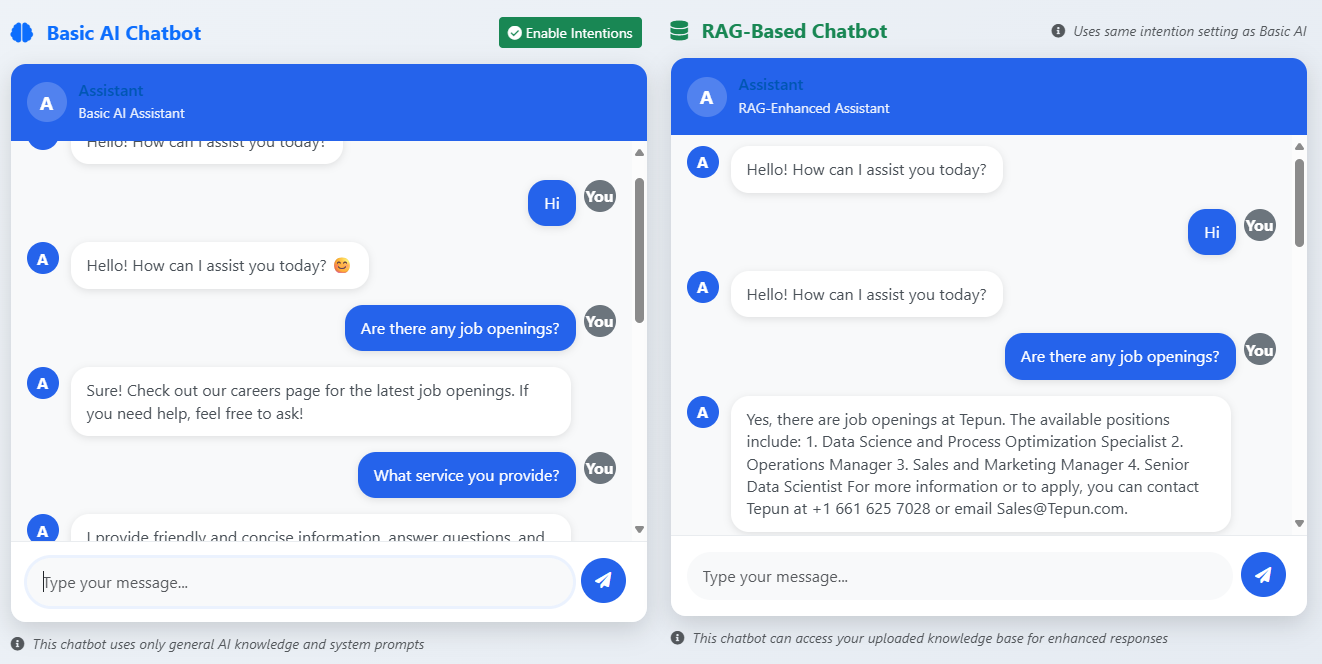
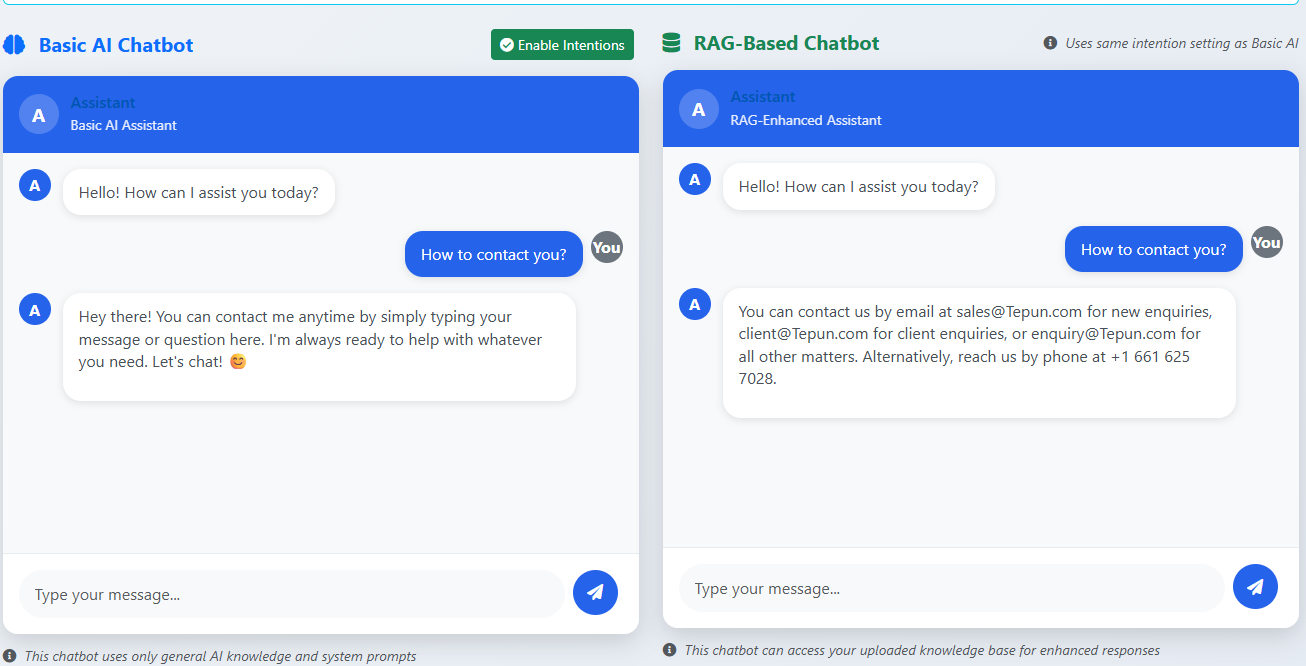
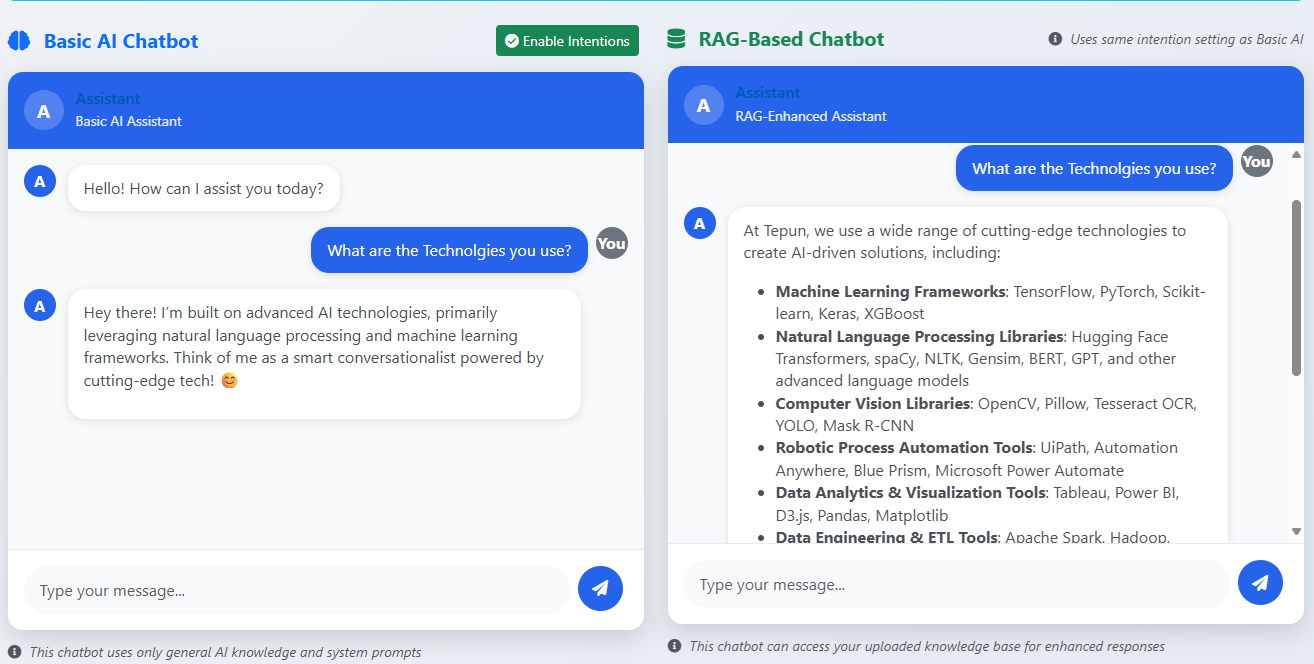
Standard AI vs RAG AI Chatbot

See the dramatic difference in response quality and accuracy with AIInSync

Standard AI Chatbot

"I'm sorry, I don't have that information. I can only provide general assistance."

Limitations:
• No access to your specific data
• Generic responses only
• Cannot answer business-specific questions
• Limited to training data

Our RAG AI Chatbot

"Based on our records, your order #12345 was shipped on September 15th and is expected to arrive on September 20th. You can track it using this link: [tracking-link]"

Advantages:
• Access to your actual data
• Specific, accurate responses
• Answers business-specific questions
• Continuously updated knowledge

General AI vs RAG AI Comparison

See the visual difference between standard AI and our RAG-powered solution

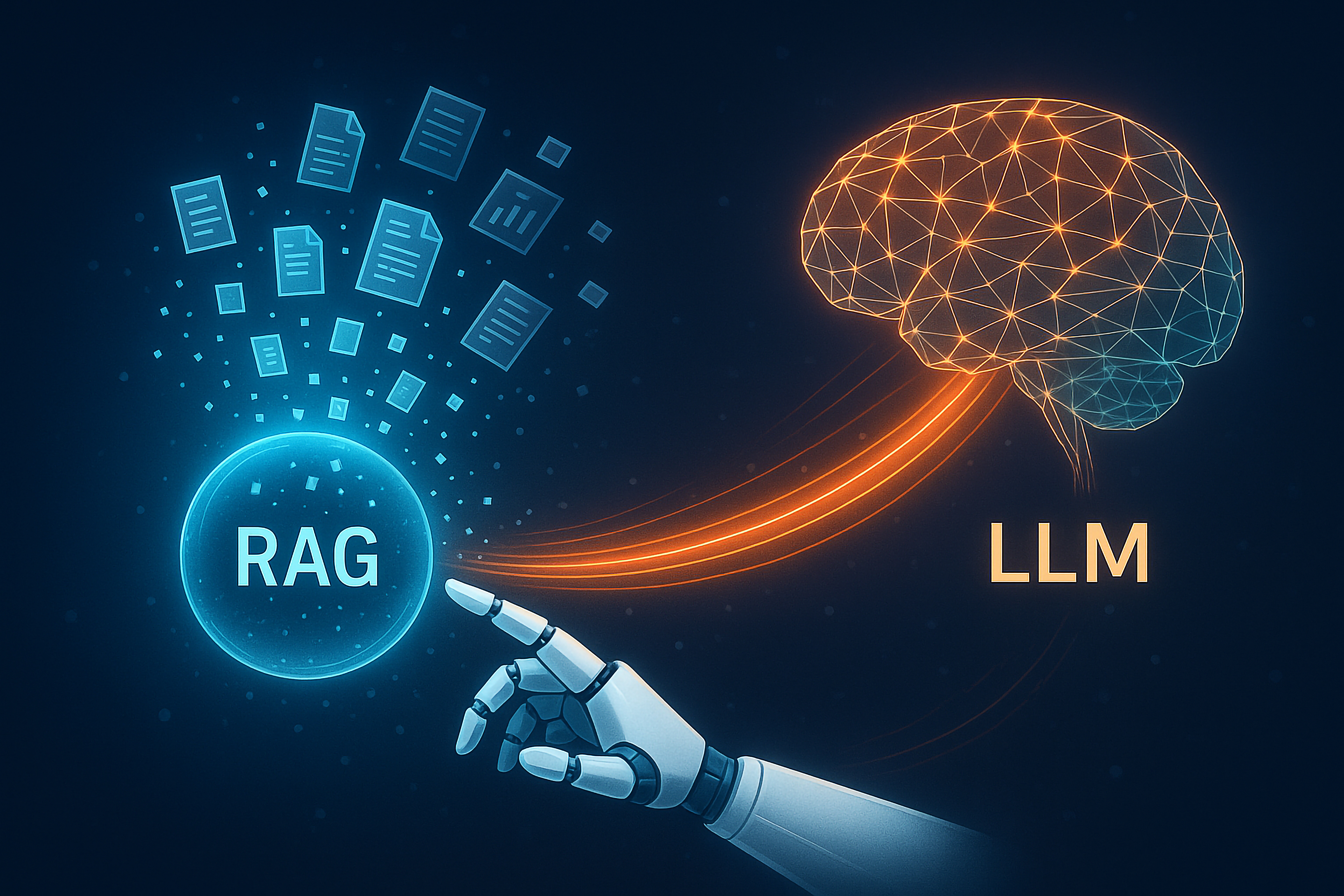
RAG AI Power by AIInSync

Why RAG AI Chatbots Excel at AIInSync

Advanced features that make the difference

Real-Time Data Access

Connects to your databases, documents, and systems to provide up-to-date information instantly.

Context-Aware Responses

Understands the full context of conversations and provides relevant, personalized answers.

Continuous Learning

Automatically updates its knowledge base as your content and data changes.

Secure & Compliant

Enterprise-grade security with data privacy controls and compliance features.

Performance Analytics

Detailed insights into user interactions and chatbot performance for continuous improvement.

Easy Integration

Seamlessly integrates with your existing systems, websites, and workflows.

Perfect For Every Business

See real-world applications of AIInSync chatbots

E-Commerce Stores

Handle product inquiries, recommend items, check order status, and guide customers through purchasing decisions—24/7 without human intervention.

  • "What colors does this shirt come in?"
  • "What's your return policy?"
  • "Can you recommend a similar product?"
  • "When will my order arrive?"
Service Businesses

Answer FAQs from your site, take a callback request when someone wants a quote or a person, and leave the pricing to your team.

  • "What services do you offer?"
  • "How much does it cost?"
  • "Can someone call me back?"
  • "What are your business hours?"
Educational Institutions

Provide instant answers to student questions, help with course information, campus services, and admissions inquiries.

  • "What courses are available?"
  • "How do I apply for financial aid?"
  • "What are the admission requirements?"
  • "Where can I find the library hours?"
Healthcare Practices

Answer hours, insurance, and services from your site. Take a callback request — the clinic starter will not give medical advice.

  • "What insurance do you accept?"
  • "Can I request a callback?"
  • "What are your office hours?"
  • "Do you offer telehealth services?"

AI Chatbot vs Traditional Chat

See why AIInSync AI-powered chatbots outperform traditional solutions

Feature Our RAG AI Chatbot Traditional Chat
Available 24/7
Learns from Your Content
Access to Your Actual Data
Instant Responses
Handles Multiple Conversations
No Human Staff Required
Gets Smarter Over Time

Comprehensive Resources

Everything you need to master your AI Chatbot

Ready to Build Your AI Chatbot with AIInSync?

Ready to build your AI chatbot?

Start free with the AIInSync Desktop app, or try Smart for 15 days for $4.99.

Get Started
Chatbot Icon